



Three Easy Steps to Restart Message on Hold After a Power Outage
After a power outage or generator test, getting your critical services back up and running is the top priority. Systems such as routers, internet connections, and phone services are essential for keeping your business operational.
One important item that often gets overlooked is Message on Hold. This simple tool plays an important role in your overall customer experience.
Think about it: Message on Hold bridges the gap between your marketing efforts and the friendly team member who answers your phone. It helps callers learn about your products and services, keeps them engaged while they wait, and reinforces your brand message.
Most businesses invest heavily in marketing activities such as websites, pay-per-click advertising, print campaigns, radio ads, and social media marketing. All of these efforts are designed to encourage potential customers to call your business.
Message on Hold connects those marketing efforts to the customer’s experience while they wait on the phone. A well-designed on-hold message can entertain, educate, and engage callers—making it an important part of your overall marketing strategy.
Now that you know Message on Hold should be on your restart checklist after a power outage, here are three easy steps to get your system running again.
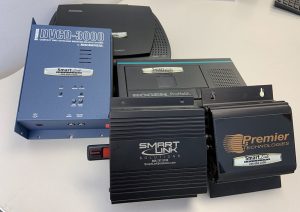
From left: Mackenzie CD Unit, IntelliTouch CD Unit, Nel-Tech USB Unit, Bogen Tape Unit, and Premier USB Unit
Step 1: Identify How Your Message on Hold Is Played
First, determine how your Message on Hold system is set up.
Some businesses play messages directly through their phone system. If this is the case, simply restoring power to the phone system should resolve the issue.
If you use a dedicated Message on Hold device, you will need to locate the unit. These devices are usually connected to your phone system and are often located in a server room, equipment closet, or technology cabinet.
Step 2: Restart the Message on Hold Device
Unplug the power cord from the device and allow it to sit for about 20 seconds. Then reconnect the power cord. In many cases, this simple restart will restore the message playback.
If the message does not restart, your next steps will depend on the type of Message on Hold unit you are using.
- USB units: Remove and reinsert the memory stick (USB drive, thumb drive, or jump drive). Follow the instructions provided in your device manual. If necessary, reload the message file onto the USB drive. You can request another copy of the manual here.
- CD units: If the message does not begin playing, remove and reinsert the CD. On some devices, simply opening and closing the CD door will reload the message.
- Tape units: Tape-based units typically reload automatically once power is restored, so you can usually leave the tape in place.
Step 3: Test Your Message on Hold
After restarting the system, test the Message on Hold to make sure it is working properly.
Call your business phone number and ask the person who answers to place you on hold. You should hear your message playing. This is also a good opportunity to adjust the volume if the audio is too quiet or too loud.
If you hear silence instead of your message, the unit may have been damaged when power was lost or restored. In that case, replacing the unit may be necessary.
Need Help With Your Message on Hold System?
Many Message on Hold providers offer telephone or online support if you need assistance. Smart Link Solutions goes a step further by offering in-person troubleshooting support for clients in the local area.
When you know what to do, restarting your Message on Hold system after a power outage can be as easy as one, two, three.
Not sure if Message on Hold is right for your business? Check out our article “Do You Really Need Message on Hold?” to learn how this simple marketing solution can improve your customer experience.
Contact Smart Link Solutions today to learn more about our Message on Hold services and how we can help your business stay connected with customers.
Betty Green has been a copywriter with Smart Link Solutions since 2008. She holds a Master of Science in Organization Development with an emphasis in organizational communication, as well as a BBA in Management from Eastern Michigan University. She has taught business communication courses at Concordia University and has worked professionally in a variety of industries.
